lvglterm LVGL Terminal for NuttShell (NSH)
LVGL application that runs an interactive NuttShell (NSH) on the display. NSH is started with its standard streams redirected through pipes, its output is rendered in an LVGL text area, and the input comes from either a touchscreen or a keyboard, selected at build time.
The shared code lives in lvglterm.c (NSH startup, output rendering, main
loop); lvglterm_touch.c and lvglterm_kbd.c implement the input
variants.
Input variants
The input source is chosen with the LVGL Terminal input source Kconfig choice (only one is built at a time).
- On-screen keyboard (touch)
CONFIG_EXAMPLES_LVGLTERM_INPUT_TOUCH(default). An LVGL keyboard widget operated by touch; a command line is typed and submitted with Enter. Suits touchscreen boards and keeps the original behaviour.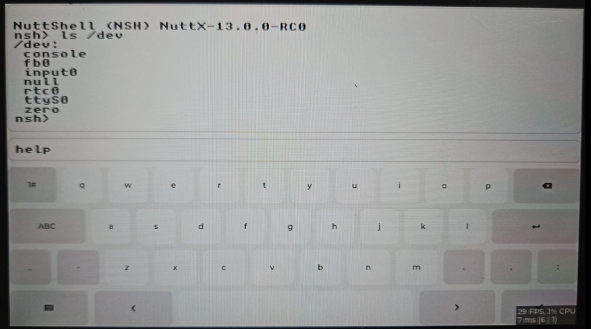
On-screen keyboard (touch) variant
- Physical keyboard
CONFIG_EXAMPLES_LVGLTERM_INPUT_KBD. Keys are read from a keyboard registered withkeyboard_register()and streamed to the shell; the output fills the whole screen. The Up and Down cursor keys scroll the output. Any keyboard works, and the terminal does not need to know which kind it is: USB HID, a matrix, the simulator, virtio.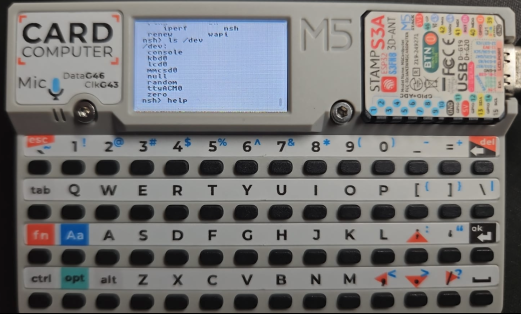
Physical keyboard variant, driven by a matrix keyboard
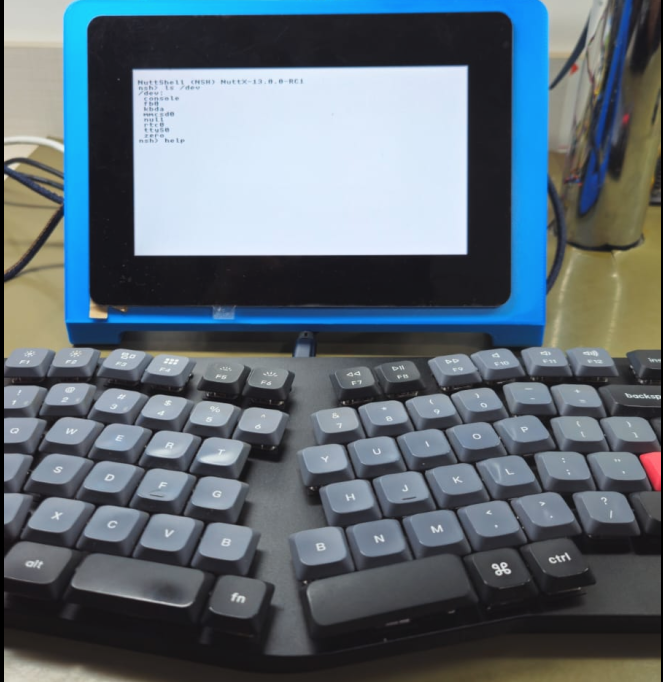
The same variant, driven by a USB HID keyboard
The keyboard defaults to CONFIG_EXAMPLES_LVGLTERM_KBD_DEV and can be
overridden at run time by passing the path as the first argument
(lvglterm /dev/kbd1) when more than one keyboard is present. Note that
the USB HID driver names its devices /dev/kbda onwards, since they come
and go as keyboards are plugged in, while the option defaults to
/dev/kbd0.
The terminal reads struct keyboard_event_s events unless the kernel was
built with CONFIG_INPUT_KEYBOARD_BYTESTREAM, in which case it reads the
byte stream that the keyboard codec defines. That is a property of the build
rather than of the hardware, so it is not something to configure here.
Driving the terminal without a keyboard
Because the terminal reads a keyboard device and does not care which one, it
can be driven from the serial console with nothing plugged in. Enable
CONFIG_UINPUT_KEYBOARD, which registers a virtual keyboard on
/dev/ukeyboard, and CONFIG_SYSTEM_KBD, which injects into it:
nsh> lvglterm /dev/ukeyboard &
nsh> kbd -i /dev/ukeyboard
Everything typed on the console appears on the display from that point on. Forwarding a real keyboard into the same virtual one lets both drive the terminal at once, which it cannot do by itself since it opens a single device:
nsh> kbd -i /dev/ukeyboard /dev/kbda &
Raise CONFIG_UINPUT_KEYBOARD_BUFNUMBER when doing this. It counts events
rather than keys, so the default of eight holds four keystrokes, and a
console hands over a whole line at once.
Font
The monospaced terminal font is chosen with the LVGL Terminal font choice:
CONFIG_EXAMPLES_LVGLTERM_FONT_UNSCII_16 (default), or the smaller
CONFIG_EXAMPLES_LVGLTERM_FONT_UNSCII_8 for low-resolution displays where
UNSCII 16 shows too few columns.
Configuration
CONFIG_LIBC_EXECFUNCS=y–posix_spawn()must be enabled.CONFIG_PIPES=y– Pipes must be enabled.CONFIG_SYSTEM_NSH=y– the NSH library must be enabled.CONFIG_GRAPHICS_LVGL=yandCONFIG_LV_USE_NUTTX=y– LVGL with its NuttX integration.A display (
CONFIG_LV_USE_NUTTX_LCDor a framebuffer). Each input variant also needs its own driver: a touchscreen (CONFIG_LV_USE_NUTTX_TOUCHSCREEN) for the touch variant, orCONFIG_INPUT_KEYBOARDand a keyboard driver for the physical variant.CONFIG_LIBC_KBDCODECis selected automatically when the build delivers the byte stream.The selected font (
CONFIG_LV_FONT_UNSCII_8orCONFIG_LV_FONT_UNSCII_16) is enabled automatically by the font choice.
Reference: NuttX RTOS for PinePhone: LVGL Terminal for NSH Shell.