PINE64 StarPro64
PINE64 StarPro64 is a RISC-V Single-Board Computer based on the ESWIN EIC7700X RISC-V SoC with Quad-Core 64-bit RISC-V CPU, 32 GB LPDDR5 RAM and 100 Mbps Ethernet.
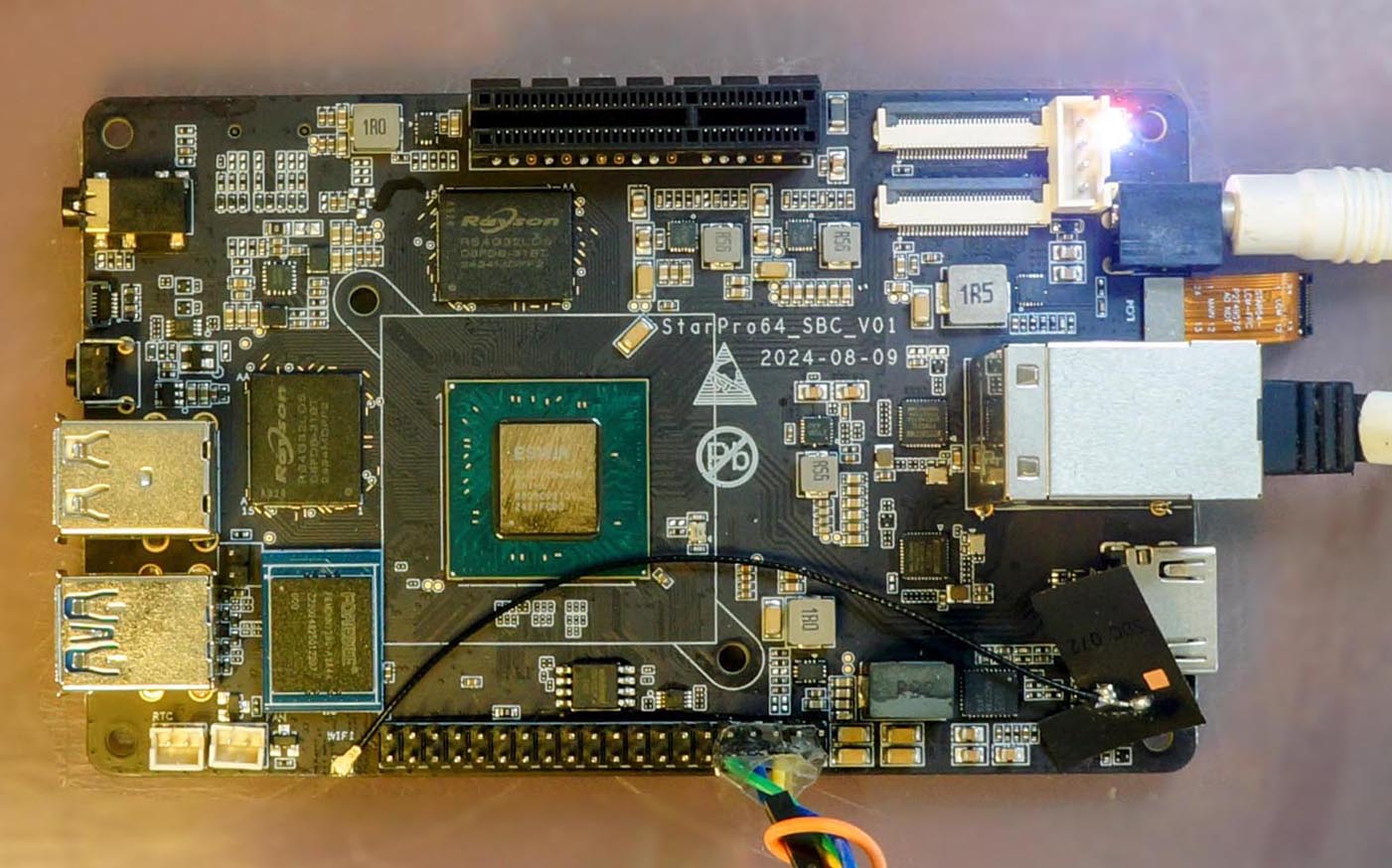
Features
System on Chip: ESWIN EIC7700X
Processors: 4 x RV64GC 1.4 GHz 64-bit RISC-V Cores
NPU: 19.95 TOPS INT8
Memory: 32 GB 64-bit LPDDR5
Storage: 1 x microSD Connector, 1 x eMMC Pad
Network: 2 x GMAC, RGMII supported
PCI Express: 4-lane PCIe 3.0 (RC + EP)
Wireless: WiFi, Bluetooth
USB: USB 2.0 and 3.0
GPIO: Full GPIO Header
Serial Console
A USB Serial Adapter (CH340 or CP2102) is required to run NuttX on StarPro64.
Connect the USB Serial Adapter to StarPro64 Serial Console at:
USB Serial |
StarPro64 Pin |
|---|---|
GND |
Pin 6 (GND) |
RX |
Pin 8 (UART0 TX) |
TX |
Pin 10 (UART0 RX) |
On the USB Serial Adapter, set the Voltage Level to 3V3.
Connect StarPro64 to our computer with the USB Serial Adapter. On our computer, start a Serial Terminal and connect to the USB Serial Port at 115.2 kbps:
$ screen /dev/ttyUSB0 115200
NuttX will appear in the Serial Console when it boots on StarPro64.
RISC-V Toolchain
Before building NuttX for StarPro64, download the toolchain for xPack GNU RISC-V Embedded GCC (riscv-none-elf).
Add the downloaded toolchain xpack-riscv-none-elf-gcc-.../bin
to the PATH Environment Variable.
Check the RISC-V Toolchain:
$ riscv-none-elf-gcc -v
Building
To build NuttX for StarPro64, install the prerequisites and
clone the git repositories for nuttx and apps.
Configure the NuttX project and build the project:
$ cd nuttx
$ tools/configure.sh starpro64:nsh
$ make
This produces the NuttX Kernel nuttx.bin. Next, build the NuttX Apps Filesystem:
$ make export
$ pushd ../apps
$ tools/mkimport.sh -z -x ../nuttx/nuttx-export-*.tar.gz
$ make import
$ popd
Package the NuttX Kernel and the applications into a NuttX Image:
$ boards/risc-v/eic7700x/common/tools/mkimage.sh
The image is the kernel, then padding, then a RAM disk holding the
applications. Use the script rather than padding by hand. The RAM disk is
found at run time by searching memory for its header, and that search runs
after BSS has been cleared, so the disk has to start above _ebss or it
is zeroed before anything looks for it. The script reads _ebss from the
kernel and pads to suit; a fixed pad works only until BSS grows past it, and
when it does the board hangs during start up with nothing on the console at
all, because the failure happens before there is a console to report it.
The NuttX Image Image-starpro64 will be copied to the TFTP Server in the next step.
Booting
To boot NuttX on StarPro64, install a TFTP Server on our computer.
Copy the file Image-starpro64 from the previous section to the TFTP Server,
together with the Device Tree:
$ wget https://github.com/lupyuen/nuttx-starpro64/raw/refs/heads/main/eic7700-evb.dtb
$ scp Image-starpro64 \
   tftpserver:/tftpfolder/Image-starpro64
$ scp eic7700-evb.dtb \
   tftpserver:/tftpfolder/eic7700-evb.dtb
Check that StarPro64 is connected to our computer via a USB Serial Adapter at 115.2 kbps:
$ screen /dev/ttyUSB0 115200
When StarPro64 boots, press Ctrl-C until U-Boot stops. At the U-Boot Prompt, run these commands to boot NuttX over TFTP:
# Change to your TFTP Server
$ setenv tftp_server 192.168.x.x
$ saveenv
$ dhcp ${kernel_addr_r} ${tftp_server}:Image-starpro64
$ tftpboot ${fdt_addr_r} ${tftp_server}:eic7700-evb.dtb
$ fdt addr ${fdt_addr_r}
$ booti ${kernel_addr_r} - ${fdt_addr_r}
Or configure U-Boot to boot NuttX automatically.
NuttX boots on StarPro64 and NuttShell (nsh) appears in the Serial Console. To see the available commands in NuttShell:
$ help
Configurations
nsh
Basic configuration that runs NuttShell (nsh). This configuration is focused on low level, command-line driver testing. Built-in applications are supported, but none are enabled. Serial Console is enabled on UART0 at 115.2 kbps.
Peripheral Support
NuttX for StarPro64 supports these peripherals:
Peripheral |
Support |
NOTES |
|---|---|---|
UART |
Yes |
|
CPU clock control |
Yes |
400 MHz to 1.4 GHz, measured not assumed |