RTL8721F EVB
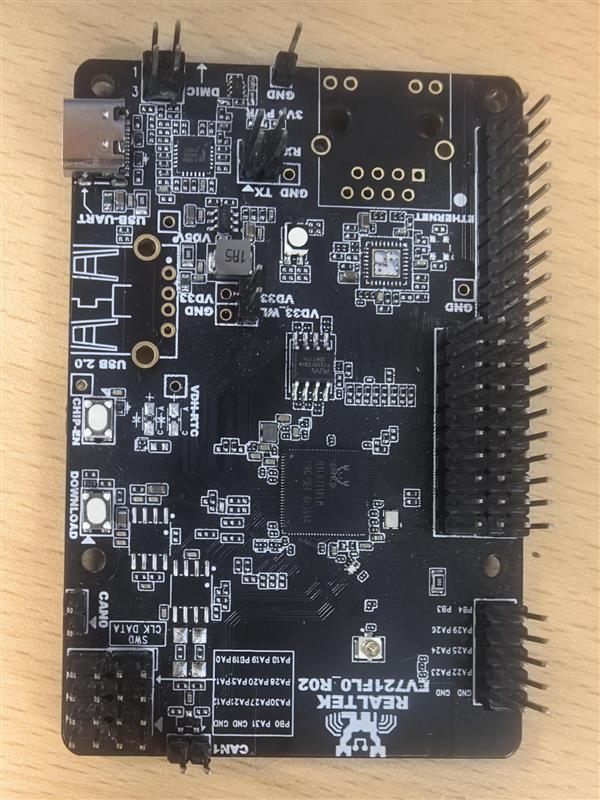
The RTL8721F EVB development board.
The RTL8721F EVB is a Realtek RTL8721F evaluation board. NuttX runs on the KM4TZ application core — an Arm Cortex-M55-compatible core running at up to 320 MHz. See the RTL8721F chip documentation for the full SoC specifications and the vendor-SDK dependency.
Features
RTL8721F: Arm Cortex-M55-compatible KM4TZ core up to 320 MHz, 512 KB SRAM, 4 MB NOR flash
Wi-Fi 6 (802.11 a/b/g/n/ax), dual-band 2.4/5 GHz station and SoftAP
SPI NOR flash (XIP)
LOG-UART console
Supported in this NuttX port:
NSH shell over the LOG-UART console
littlefs persistent storage mounted at
/data(a dedicated SPI NOR flash partition)Wi-Fi station and SoftAP through the
wapitoolDHCP client (STA) and DHCP server (SoftAP)
GPIO pins exposed as
/dev/gpioNcharacter devices (input, output and interrupt), driven directly on the SDK fwlib register layerGeneral-purpose UARTs exposed as
/dev/ttySNserial devices, driven directly on the SDK fwlib register layerI2C master buses exposed as
/dev/i2cNcharacter devices, driven directly on the SDK fwlib register layerSPI master buses exposed as
/dev/spiNcharacter devices, driven directly on the SDK fwlib register layerPWM output exposed as a
/dev/pwm0character device, driven directly on the SDK fwlib timer register layerADC channels exposed as an
/dev/adc0character device, driven directly on the SDK fwlib register layerOn-chip RTC exposed as a
/dev/rtc0date/time character device with alarm support, driven directly on the SDK fwlib register layerOn-chip watchdog exposed as a
/dev/watchdog0character device, driven directly on the SDK fwlib register layerGeneral-purpose timers exposed as
/dev/timer0and/dev/timer1character devices, driven directly on the SDK fwlib register layer
Configurations
Build and flash any of these per the RTL8721F build instructions; for the CMake build, source . tools/ameba/env.sh
rtl8721f_evb first (the make build needs no sourcing).
$ ./tools/configure.sh rtl8721f_evb:<config-name>
gpio
Minimal NSH with the GPIO driver and the gpio example enabled (no Wi-Fi).
The board registers three pins from its pin table (see
boards/arm/rtl8721f/rtl8721f_evb/src/rtl8721f_gpio.c): an output at
/dev/gpio0, an input at /dev/gpio1 and an interrupt pin at
/dev/gpio2. Edit that table to match a board’s wiring. Exercise them with
the example:
nsh> gpio -o 1 /dev/gpio0     # drive the output high
nsh> gpio /dev/gpio1          # read the input
nsh> gpio -w 1 /dev/gpio2     # wait for a falling-edge interrupt
Pins are encoded with the AMEBA_PA() / AMEBA_PB() helpers from
arch/arm/src/common/ameba/ameba_gpio.h (port A/B, pin 0-31), matching the
Ameba SDK PinName layout.
uart
Minimal NSH with the general-purpose UART driver and the serialrx /
serialblaster examples enabled (no Wi-Fi). The LOG-UART owns the console
and /dev/ttyS0, so the board registers UART0 from its table (see
boards/arm/rtl8721f/rtl8721f_evb/src/rtl8721f_uart.c) as /dev/ttyS1 at
115200 8N1. Edit that table – controller, TX/RX pads and baud – to match a
board’s wiring. The TX/RX pads use the same AMEBA_PA() / AMEBA_PB()
encoding as the GPIO table; the driver muxes them to the UART function and
pulls RX high through the SDK ROM. Exercise the port with the examples (loop TX
back to RX, or wire it to a host serial adapter):
nsh> serialrx /dev/ttyS1 2600 &     # start the receiver first
nsh> serialblaster /dev/ttyS1 2600  # then loop TX back to RX
The line format can be changed at runtime through tcsetattr() (the config
enables CONFIG_SERIAL_TERMIOS). UART3 is shared with Bluetooth and is not
exposed by the driver.
i2c
Minimal NSH with the I2C master driver and the i2ctool (system/i2c)
enabled (no Wi-Fi). The board registers its I2C controllers from a table (see
boards/arm/rtl8721f/rtl8721f_evb/src/rtl8721f_i2c.c): I2C0 at /dev/i2c0
on PA22/PA23 and I2C1 at /dev/i2c1 on PA24/PA25. Edit that table –
controller and SCL/SDA pads – to match a board’s wiring; the pads use the
same AMEBA_PA() / AMEBA_PB() encoding as the GPIO table and are muxed
to the I2C function through the SDK ROM. The I2C bus is open-drain, so fit
external pull-ups on SCL/SDA. Probe a bus with the tool:
nsh> i2c dev -b 0 0x03 0x77 # scan /dev/i2c0 for devices
spi
Minimal NSH with the SPI master driver and the spi tool
(system/spi) enabled (no Wi-Fi). The board registers two buses from its
table (see boards/arm/rtl8721f/rtl8721f_evb/src/rtl8721f_spi.c): SPI0 at
/dev/spi0 with CLK/MOSI/MISO on PA14/PA15/PA16 and a software chip-select
on PA17, and SPI1 at /dev/spi1 with CLK/MOSI/MISO on PB13/PB14/PB15 and a
software chip-select on PB16. Edit that table – controller, CLK/MOSI/MISO
pads and CS pad – to match a board’s wiring; the pads use the same
AMEBA_PA() / AMEBA_PB() encoding as the GPIO table and are muxed to
the SPI function through the SDK ROM, while the chip-select is driven as a
plain GPIO. Note that SPI0 and SPI1 route to different pad groups in the chip
pin-mux spec (SPI0 on the PA group, SPI1 on the PB/PC group); pick pads the
spec lists for that controller. Exercise a bus with the tool:
nsh> spi exch -b 0 -x 4 deadbeef     # full-duplex transfer on /dev/spi0
nsh> spi exch -b 1 -x 4 deadbeef     # full-duplex transfer on /dev/spi1
pwm
Minimal NSH with the PWM driver and the pwm example
(examples/pwm) enabled (no Wi-Fi). The board registers one timer at
/dev/pwm0 (see boards/arm/rtl8721f/rtl8721f_evb/src/rtl8721f_pwm.c):
TIM4 drives up to four compare channels off one shared time base, so every
channel shares one frequency and each carries its own duty cycle. The example
table routes channel 1 to PA24 and channel 2 to PA25; edit it – one pad per
channel, AMEBA_PWM_PIN_NC for the unused ones – to match a board’s
wiring. The pads use the same AMEBA_PA() / AMEBA_PB() encoding as the
GPIO table and are muxed to the PWM function through the crossbar. Set
CONFIG_PWM_NCHANNELS to the number of channels used. Exercise it with the
example:
nsh> pwm -d 25 -f 1000 # 1 kHz, 25% duty on /dev/pwm0
adc
Minimal NSH with the ADC driver and the adc example enabled (no Wi-Fi).
The board registers its channels from a table (see
boards/arm/rtl8721f/rtl8721f_evb/src/rtl8721f_adc.c): /dev/adc0 samples
CH0 on PA20 and CH1 on PA19. Edit that table – channel numbers and the analog
pad each is wired to – to match a board’s wiring; the external channels
CH0..CH7 map to pads PA20,PA19,PA18,PA17,PA15,PA14,PA13,PA12 and are muxed to
the ADC function through the SDK ROM, while internal channels carry
AMEBA_ADC_PIN_NC. Every listed channel is sampled, in order, on each
trigger. Read the channels with the example:
nsh> adc -n 1 # one sweep of /dev/adc0
rtc
Minimal NSH with the on-chip RTC driver and the alarm example enabled
(no Wi-Fi). The RTC is registered at /dev/rtc0 from the board bring-up
(boards/arm/rtl8721f/rtl8721f_evb/src/rtl8721f_rtc.c); it has no board
wiring (it is an internal clock). The hardware stores year + day-of-year, so
the shared driver bridges to a full calendar. Read and set the clock with the
NSH date command, and arm a one-shot wakeup with the example:
nsh> date                            # read /dev/rtc0
nsh> date -s "Jun 16 12:00:00 2026"  # set the RTC
nsh> alarm 10                        # fire an alarm in 10 seconds
wdg
Minimal NSH with the on-chip watchdog driver and the wdog example
enabled (no Wi-Fi). The watchdog is registered at /dev/watchdog0 from the
board bring-up (boards/arm/rtl8721f/rtl8721f_evb/src/rtl8721f_wdg.c); it
has no board wiring (it is an internal timer). Exercise it with the example,
which opens the device, sets a timeout, and pings it:
nsh> wdog # run the watchdog example
timer
Minimal NSH with the on-chip general-purpose timer driver and the timer
example enabled (no Wi-Fi). Two 32-bit basic timers clocked at 32.768 kHz are
registered from the board bring-up
(boards/arm/rtl8721f/rtl8721f_evb/src/rtl8721f_timer.c) as /dev/timer0
(TIM1) and /dev/timer1 (TIM2); they have no board wiring (they are
internal). TIM0 is reserved by the boot ROM as the system timer and is not
exposed. Exercise a device with the example, which sets an interval and counts
the update interrupts:
nsh> timer -d /dev/timer0 # run the timer example on TIM1
nsh
Networking-enabled NSH with littlefs at /data and the wapi Wi-Fi tool.
The console is the LOG-UART at 1500000 8N1 (the rate is configured by the
bootloader and inherited by NuttX). The Wi-Fi examples below are available from
this configuration.
Wi-Fi
Station (connect to an AP):
nsh> wapi psk    wlan0 <password> 3
nsh> wapi essid  wlan0 <ssid> 1
nsh> renew wlan0
SoftAP (become an access point, with a DHCP server for clients):
nsh> wapi mode   wlan0 3
nsh> wapi psk    wlan0 <password> 3
nsh> wapi essid  wlan0 <ssid> 1
nsh> ifconfig    wlan0 192.168.4.1 netmask 255.255.255.0
nsh> dhcpd_start wlan0
Stop the SoftAP with wapi essid wlan0 <ssid> 0.
License Exceptions
This board depends on Realtek vendor code that is not part of NuttX and is subject to its own license:
The prebuilt Wi-Fi / Bluetooth firmware image and the Realtek
ameba-rtosSDK libraries/headers linked into the image. See the SDK’s own license; the SDK is auto-fetched and is not redistributed in the NuttX tree.